Why Slidev + AI is the most underrated combo for developers who present, with real examples from a live security demo that would have taken me days to code by hand.
slidevAIvueDXtalks
Last week I built a security talk with AI and Slidev. Here’s the title slide:
The cursor drop, the red ripple, the word growth, the auto-advance: I described it in plain English and got working Vue + CSS on the second try. I wrote maybe 10% of the actual code.
The combination of Slidev and an LLM at your side has quietly crossed a threshold for developers who present: the more your presentation tool feels like code, the more AI multiplies it. Things that used to take four hours of fiddling in Keynote, or weren’t reachable at all, are now thirty seconds of describing what you want.
Slidev compiles a single slides.md file into a Vite + Vue 3 SPA. Slides are separated by ---. Frontmatter sets layout, theme, transitions. You drop Vue components inline, style with Tailwind, run logic in <script setup> blocks. That’s the whole mental model.
As the deck grew, I split content into imported files instead of one giant markdown blob:
md
---src: ./slides/02-the-attack.md---<!-- ... other slides ... -->---src: ./slides/05-dcj.md---
Slidev merges them at build time. Each section stays small enough for the model to edit without losing context.
What makes it click with AI isn’t a special integration or a clever plugin. It’s that Slidev presentations are the web stack. Markdown, Vue, Tailwind, Vite: four things every coding model has consumed at industrial scale. When you ask for “a cursor that drops onto the title, presses down, bounces, with a red ripple expanding on impact”, the model doesn’t have to translate from a proprietary slide format. It writes CSS keyframes and a v-click directive.
Compare that to Keynote, where your “AI integration” is asking ChatGPT which menu to click in. Or PowerPoint VBA, which every model has seen but none of them want to write.
This isn’t a happy accident. The Slidev team ships an official skill you install in one command:
bash
npx skills add slidevjs/slidev
The same CLI I covered in Agent Skills: The Missing Piece of Your AI Workflow. Once installed, your agent stops guessing: it knows the layout names, the click directives, the magic-move syntax, the transition options. The hallucination rate on Slidev-specific syntax drops to near zero.
There’s also a VSCode extension exposing Language Model Tools, so Copilot can introspect your running deck while you build: “what’s on the active slide?”, “find slides matching this title”, “jump to slide N”. The model isn’t just generating slides anymore. It’s navigating the deck with you.
Here’s the demo I keep coming back to. Three slides in my clickjacking deck need the same trick: an attacker page on the bottom layer with cheesy “🎉 Claim your prize!” copy, a real victim iframe stacked on top at controlled opacity, and a slider that lets the audience drag the deception away in real time. The whole thing lives in one reusable Vue component:
vue
<ClickjackDemo victim-url="/victims/bank.html" attacker-title="🎉 You've been selected!" attacker-body="Click below to claim your €500 Amazon voucher." attacker-button="Claim Prize Now 🎁" victim-label="SecureBank: Confirm Transfer $500" :height="270"/>
That’s it. Six props, three slides reuse it with different victim pages. Try doing that in Keynote.
I described what I wanted: “an iframe loading a real page, a fake attacker page underneath visible by default, a range slider that controls the iframe’s opacity from 0 to 100, with labels showing what each layer is”. The model wrote the whole component: the styling for the slider, the layered z-index dance, the pointer-events: none trick to keep the attacker layer clickable while the iframe is invisible. Twenty minutes from prompt to a live demo that landed.
The cursor animation from the title slide above? Same story. I described the choreography in plain English (cursor drops in, presses down, ripple expands, word grows, auto-advance after 1.2 seconds) and got it. The model knew about v-click, useNav(), and Slidev’s reactive $clicks counter. I didn’t.
This is the part PowerPoint and Keynote can’t compete with. It’s not that their feature set is too small. It’s that the gap between describing what you want and getting working code is two orders of magnitude larger when there’s no code in the loop.
Fair question. Gamma, Tome, Beautiful.ai and others generate entire decks from a single prompt. Polished templates, zero learning curve. Why bother with Slidev?
Three reasons that matter for developers specifically.
1. The customization ceiling. No-code tools have a fixed component library. Perfect for “Q3 revenue, bullet points, a chart”. A wall when you want a live iframe with an opacity slider, a Monaco editor running real code, or a custom SVG cursor animation. Slidev’s ceiling is “anything you can build with Vue + Tailwind”, which means: anything.
2. You own the source. Your deck lives in git as markdown and Vue. You can version it, fork it, host it offline, copy snippets between projects. Gamma and Tome host your decks on their platforms. If they sunset, raise prices, or break the export feature, your work is hostage.
3. When AI fails, you can fix it. On Slidev I opened the file, inspected the element, and pushed back. On Gamma, when the model gets it wrong, you’re stuck with a “regenerate” button and hope.
Honest caveat: if you’re building a corporate deck with bullet points and stock photos, no-code tools will ship faster than Slidev. The argument here is about technical talks, where the demos are the message.
Open my clickjacking repo and notice what’s missing: no linter, no tests, no CI, no PR review. The CLAUDE.md literally says “No linter or test runner is configured.” That’s not laziness, it’s the right call.
A presentation lives 30 minutes. The audience doesn’t review your code. The component you wrote at midnight to float a fake bank page over a real iframe will never be opened again after the talk ends. Optimizing it for maintainability is like writing unit tests for a Post-it note.
This is where Slidev + AI really earns its keep, and where the usual “AI generates slop” critique inverts. In production, slop compounds: every shortcut becomes a 2am page six months later. In a slide deck, slop evaporates. The talk happens, the deck gets archived, the worst case is that some animation looked slightly janky for five seconds.
You can ask the model to try something weird without weighing it against a maintenance cost. “Make the title shake when I press space.” “Add a confetti burst when I reach the conclusion.” “Animate every code block character by character on reveal.” If it works, it ships. If not, delete the slide and move on. The cost of experimentation drops to zero.
That asymmetry is the whole game. AI stops being a productivity tool and becomes a creative partner.
Slidev isn’t just “markdown that renders slides.” It ships the whole presentation pipeline, and most of it is what made the clickjacking talk shippable beyond my laptop.
pnpm build exports a static SPA to dist/. Point Vercel or Netlify at it, add a SPA fallback rewrite, done. My deck is live: audience can replay the demos after the talk, I send one URL instead of a PDF, and OAuth callbacks get their own route rules in vercel.json. No separate hosting setup for “the app” versus “the slides.” It’s one Vite project.
Reference them from Vue components (victim-url="/victims/bank.html"), plain slide iframes, or popup launchers. No CDN upload step, no “paste this embed URL” workflow. Drop an HTML file in public/, reload, it works in dev and in production. For a security talk where the victim pages are the demo, that alone beats every slide tool I’ve used.
Press P during the talk (or open /presenter) for the speaker view: current slide, next slide preview, timer, click step counter. HTML comments at the bottom of a slide become presenter notes, invisible to the audience:
md
<!--PRESENTER NOTE:Start with opacity at 0 so the audience only sees the prize page.Slowly drag the slider to reveal the bank transfer underneath.Don't click Authorize on the real GitHub demo.-->
Every live demo slide in my deck has notes like this. Rehearsal script lives in the repo, versioned with the slides, not scribbled in Keynote’s speaker notes panel where nobody else can see it.
pnpm export (backed by slidev export) spits out PDF or PPTX when an organizer needs a file attachment. I still present from the live SPA because the interactive demos are the point. But having export one command away means you’re not maintaining two formats by hand.
pnpm dev gives the same edit-and-see-it loop as frontend dev: change a Vue component, it’s live on the slide before you’ve switched windows. That shared loop is exactly why pair-programming slides with an AI feels natural instead of bolted on.
The “delete the slide and move on” approach works for a one-off talk. It starts to creak when you give a lot of them.
Present once a quarter and you’ll notice patterns: every deck has a similar intro structure, the same transition style, comparable code-walkthrough layouts. You’ll also notice you’re re-prompting the model for the same components each time. That’s the moment to build a factory.
Slidev supports this out of the box:
Custom themes are npm packages exposing layouts and global styles. Build one, reuse it across every deck.
components/ ships with every project. Pull your <ClickjackDemo>-style helpers into a personal collection.
A snippets folder for the prompt templates and slide patterns you keep retyping.
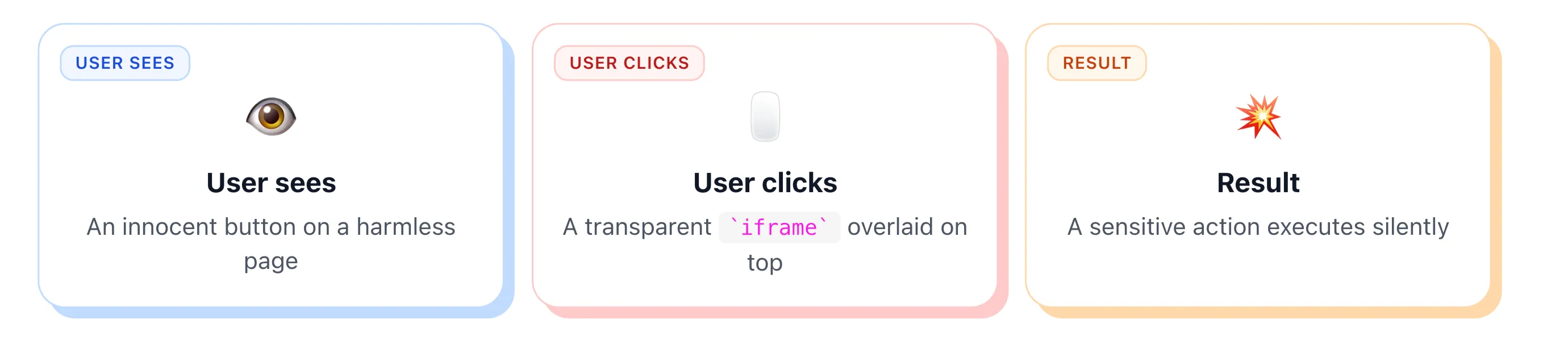
Take this three-card explainer from the deck:
One Vue component, three props. The kind of thing I'll happily lift into my next deck instead of re-prompting for it.
It’s a single Vue component taking three card props (label, title, body). Designed once, useable in any deck where I need to break a concept into “before / during / after”. That’s how a factory grows: organically, one “wait, I want this again” at a time.
In practice I haven’t done much of this yet. The clickjacking deck is my first non-trivial Slidev project. By talk five or six I’ll have extracted my own theme. Until then, every new deck starts as a fresh npm create slidev.
That’s fine. Premature optimization for reuse, before you know what’s worth reusing, is its own trap.
If you give talks, install Slidev tonight. Run npx skills add slidevjs/slidev. Describe the slide you wish you could build. See what you can pull off.
The presentation tool that feels most like coding is also the one that benefits most from AI. That correlation isn’t an accident.
My clickjacking deck started as one animated title and three iframe demos. It ended as a deployed talk with live OAuth, extension clickjacking, a reusable card system, and speaker notes on every demo slide. Same toolchain the whole way.
From there, the ceiling is whatever you can describe in plain English.